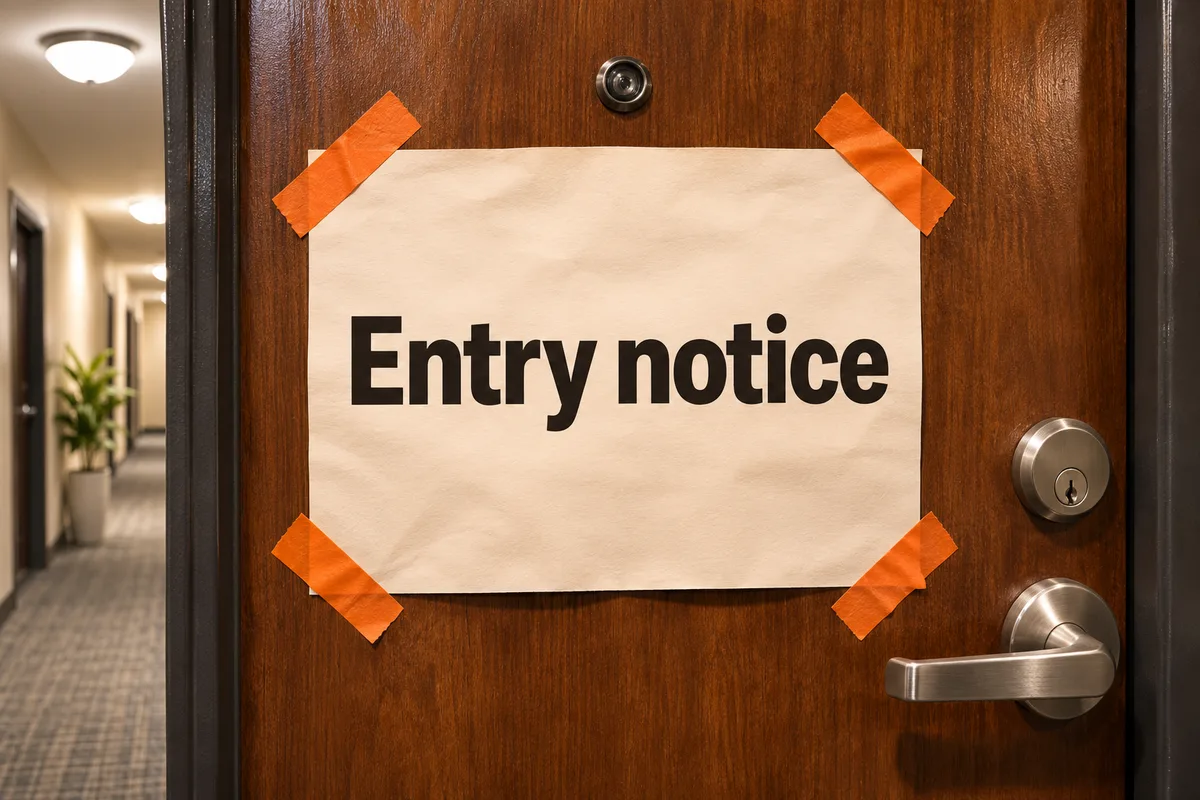
What a notice of entry is for
A resident's home is theirs to live in, even though you manage the building. Most leases and most state landlord-tenant laws let you enter for repairs, inspections and showings, but only with notice, at reasonable times, and for a real reason. The notice is the proof that you followed those rules.
It also does a quieter job. A clear notice is the difference between a resident who leaves the dog with a neighbour and one who opens the door to a stranger in their kitchen. Most complaints about entry are not about the visit. They are about the surprise.
So the notice has two readers. The resident reads it to plan their day. Anyone who looks at the file later, an owner, a lawyer or a housing inspector, reads it to see whether your firm did what the lease and the law say. Write it so both can find the answer in a few seconds: which home, which day, which hours, what job, and who to call.
Why entry notices go wrong
Three people touch every entry, and none of them sees the whole picture. The vendor wants a slot that fits their route. The resident wants to know when strangers will be in their home and whether they need to be there. The coordinator sits in the middle, holding a work order, a lease and a calendar, usually while answering the phone.
The notice breaks when one of those three changes something and the other two do not hear. The vendor moves the job to the afternoon. The resident replies that the day does not work and nobody logs it. The coordinator sends the notice before the vendor confirmed, because the work order looked settled. Each slip is small. Together they produce the call nobody wants: a resident who came home to find someone in their kitchen with no warning they recognised.
Almost none of this is about wording. It is about sequence. Get the confirmation first, count the days from delivery, send one clear notice, and send a new one when anything moves. The template below matters less than that order.
What every notice must say
Six facts carry the whole notice. If any of them is vague, the resident has to call to find out, and a call about a notice is a sign the notice did not work. Each one also has a source you can check, so the notice is never written from memory.
Pull the names from the current lease rather than the unit label in your software, because the people living there may have changed at renewal. Pull the date and window from the vendor's written confirmation. And name the job in words the resident would use themselves: "replace the kitchen faucet" tells them more than "plumbing work order".
| Item | Write it as | Check against |
|---|---|---|
| Unit and resident | The address and unit, and the names on the lease | The current lease, not last year's |
| Date | A specific day | Your required notice period, counted from delivery |
| Time window | A start and end time, as narrow as the vendor allows | What your state and lease call reasonable hours |
| Reason | The actual job, for example "replace kitchen faucet" | A reason your lease and local law allow |
| Who is entering | Your firm, the vendor's company, or both | The confirmed work order |
| Contact | A named role and a number someone answers | Who is actually on that day |
"Maintenance" is not a reason. Neither is "inspection" on its own. The resident should be able to tell from the notice what will happen in their home.
The notice period, the allowed reasons and the hours you may enter are set by your state, sometimes your city, and your lease. They differ from place to place, and how the notice is delivered (posted, mailed, emailed) can change when the clock starts. We are not listing state rules here because we will not print one we have not sourced. Get the rules for each place you manage, in writing, from your counsel.
This is a working template, not legal advice. Notice periods, fee limits and required wording depend on your lease and on state and local law. Check yours with your own counsel before using it.
The template
Notice of entry: [address], unit [unit]
To: [resident names on the lease]
Date of this notice: [date]
We will need to enter your home on [day and date] between [start time] and [end time].
Reason: [the job, in plain words].
Who will enter: [firm name] and/or [vendor company].
You do not need to be home. If you have a pet, please secure it or let us know so we can plan around it. If this time does not work, contact [role] at [contact] by [date] and we will try to find another.
[Firm name]
Two lines in there are optional and worth keeping. "You do not need to be home" heads off the most common reply. The pet line saves a vendor from a locked-out visit or worse.
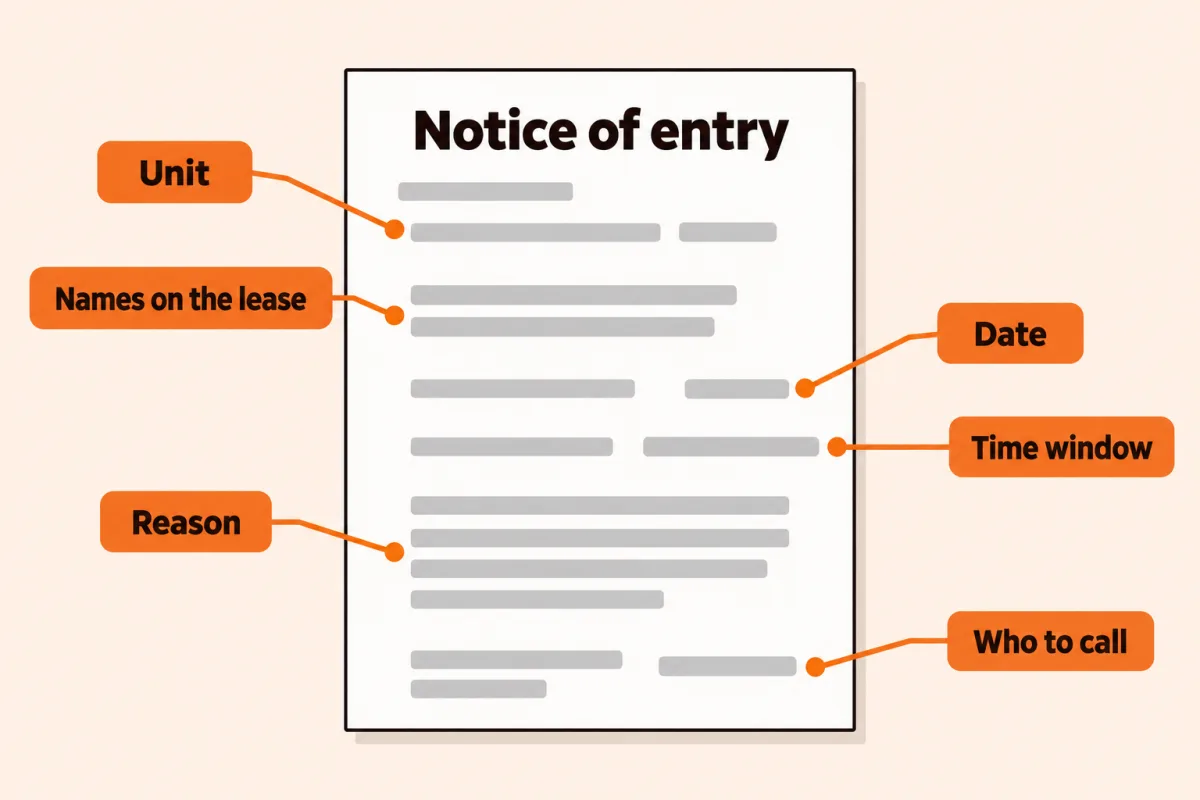
Keep the tone plain. The resident did nothing wrong by needing a repair, so the notice should read like a heads-up from a building that is organised, not a warning. Short sentences, the date in bold, and one person to contact. If your firm sends notices in more than one language, translate the template once, have it checked, and keep both versions in the same file so the facts never drift between them.
The checks before it goes
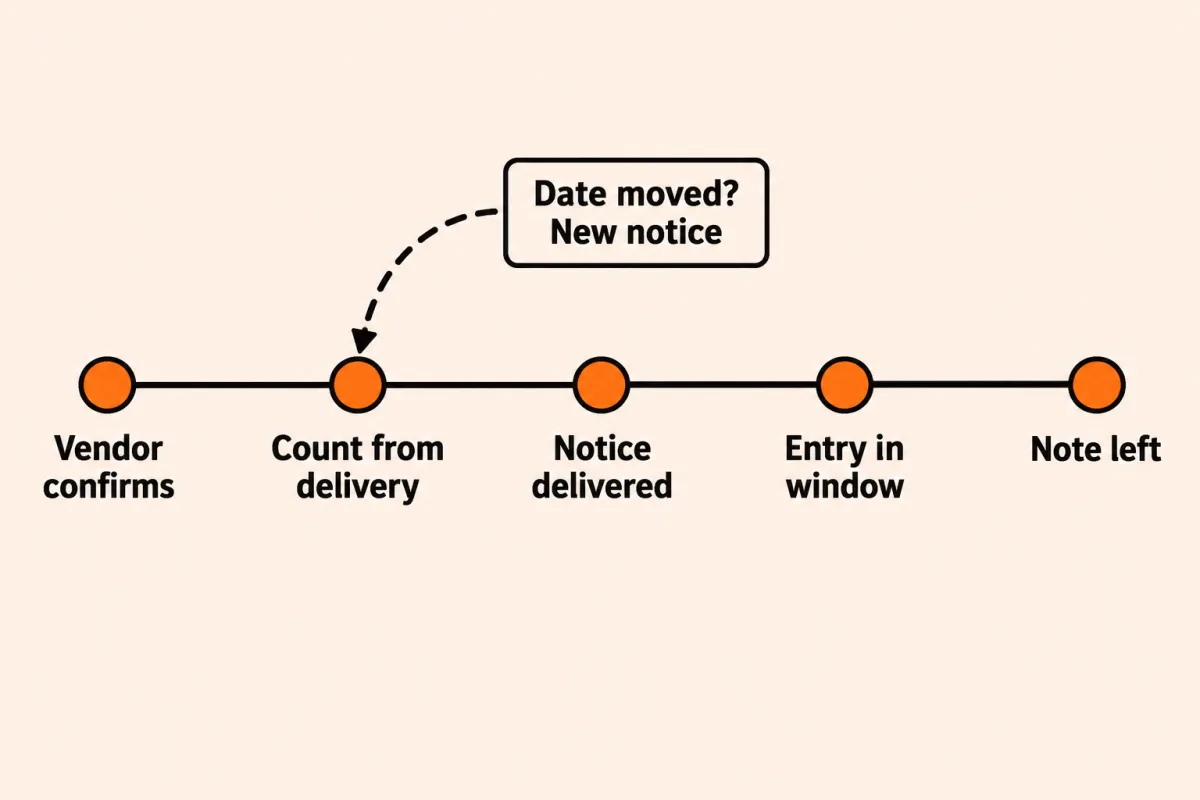
The checks run in a fixed order, and the order is the point. Every step depends on the one before it. A notice written before the vendor confirmed has a date that may be wrong. A notice counted from the day you wrote it, rather than the day it was delivered, may be short. A notice delivered by a method your lease does not allow may not count at all.
Run the five steps the same way every time, for every unit, even on a busy week. It is faster than it looks once the vendor confirmations arrive in one place.
From work order to delivered notice
The step people skip is the last one. A changed date usually needs a new notice.
Nearly every entry problem traces back to the first step. A notice sent before the vendor confirmed is a notice that will be wrong, and a second notice with a new date restarts the clock in most places. Wait for the confirmation.
Keep a copy of every notice and a record of how and when it was delivered. If a resident says they never got it, the log is the only answer you have.
A walkthrough: one faucet, two dates
Here is an example. A resident reports a dripping kitchen faucet through the portal on a Monday. It is not an emergency, so it goes into the normal queue. The coordinator assigns it to the firm's usual plumber and asks for a date.
The plumber replies on Tuesday offering Thursday of the following week, any time. The coordinator does not send a notice yet. "Any time" means an all-day window, and an all-day window means the resident may take a day off to wait. So the coordinator asks for a narrower slot and gets a morning window in writing.
Now the coordinator counts. The firm's rules, written down once from counsel, say how much notice is required and which delivery methods count. The notice will be emailed and posted on the door that afternoon, so the count starts from that delivery. Thursday of next week clears the period with room to spare. The notice goes out with the date, the morning window, "replace the leaking kitchen faucet", the plumbing company's name and the coordinator's direct line. A copy and the delivery time go into the unit file.
On Monday the plumber calls: a part is delayed, can they come Friday instead? This is the step people skip. The coordinator does not send a quick text saying "it moved to Friday". They check whether Friday still clears the notice period from a new delivery, send a fresh notice with the new date and window, and log both notices. The resident gets one clear message, the plumber turns up inside the stated window, and the plumber leaves a short note on the counter saying what was done.
Nothing in that sequence needs judgement the coordinator does not already have. It needs the steps in order, written down, so they happen the same way on a quiet week and a busy one.
When entry is different
Emergencies
Most laws and leases allow entry without the usual notice in a real emergency, such as a leak coming through a ceiling or a gas smell. What counts, and what you must tell the resident afterwards, varies. Leave a note that you entered, when and why, and follow your counsel's guidance. Do not use the emergency route for a routine job that has become urgent for you.
Showings
Showings to new residents or buyers are often allowed, but some places set different rules for them. Bunch showings into windows rather than sending a notice for each viewing, if your rules allow it.
When the resident says no
Do not argue in writing, and do not enter anyway on a routine job. Offer another time, note the refusal, and talk to your counsel if it keeps happening.
Hi [first name], thanks for letting us know [date] does not work. Could you give us two times in the next [days] that suit you? The [job] still needs to be done, and we would rather do it when it works for you.
The mistakes that cause complaints
Most entry complaints come from a handful of repeat mistakes. None of them is dramatic. They are the ordinary shortcuts a busy coordinator takes, and each one shifts the cost onto the resident: a lost morning, a nervous pet, a stranger at the door.
The table covers the four that come up most. Two more are worth a sentence each, because they are easy to miss.
| Mistake | What the resident experiences | Fix |
|---|---|---|
| An all-day window | A day off work to wait in | Ask the vendor for a narrower window before you send |
| The vendor arrives outside the window | A stranger at the door they were not told about | Send the window to the vendor too, and a new notice if it moves |
| A vague reason | Worry about what is being checked | Name the job |
| No note left after entry | Signs someone was in, and no explanation | Leave a short note of what was done |
Using last year's names. A notice addressed to a resident who moved out at renewal tells the current resident that nobody checked. Pull the names from the current lease every time, not from the unit label or an old email thread.
Treating a resident's reply as noise. When a resident writes back that the day does not work, that reply belongs in the work order, not only in someone's inbox. If the coordinator who read it is off the next day, the vendor turns up anyway and the resident feels ignored. Log every reply where the whole team can see it.
How to adapt it
The template stays the same everywhere. What changes is the volume, the delivery method and where the facts live.
A small portfolio of single family homes sends a handful of notices a week, often by email or text if the lease allows it. The risk there is informality: a friendly text that leaves out the window or the reason. Use the full template even when the resident knows you by name, because the notice is the record.
A multifamily building often needs one notice for many units at once, for example a smoke alarm check or pest treatment across a floor. Send each unit its own notice with its own window, or a building notice that lists the windows by floor, depending on what your lease and local rules accept. If the job is about water, the water shutoff notice template covers the extra details residents need.
Owners who self-schedule vendors are the hardest case, because the vendor may contact the resident directly. Agree in your management agreement that every entry goes through your notice process, so the record stays with the firm.
Your software changes where the facts come from, not the steps. In AppFolio, Buildium, DoorLoop or Rent Manager, the work order holds the vendor and the job, and the tenant record holds the names and contact details. Some systems can send notices from a template; if yours does, put this wording into that template and keep the checks outside it.
Draft the week's notices with AI
Notices are a good AI job because the facts all come from the work order and the rules never change between them. Put your notice rules (period, hours, delivery method, the template) in a ChatGPT or Claude Project. Each week, attach the confirmed work orders and send:
Using the notice rules and template in this Project, draft a notice of entry for each confirmed work order attached. Use only the dates, times, units and reasons in the file. Count the notice period from the delivery date in the rules. If an order has no confirmed date, or the notice period cannot be met, skip it and list it at the end as TO CONFIRM.Check every date before delivery. If you have not set up a Project before, start with how to choose and set up your AI tool.
Here is the split that works. AI is good at the copying: lifting the unit, the names, the date, the window and the job from each work order into the template, without the typos that creep in on the twentieth notice of the afternoon. It is also good at the boring comparison, flagging any order where the confirmed date is too close to meet your notice period.
A person decides everything else. Whether a reason is allowed under your lease. Whether a job that feels urgent is a real emergency. Whether a resident's refusal needs a call from a manager. And a person checks each draft against the work order before it is delivered, because a wrong date on a notice is worse than a late one.
The Resident Notice Agent is built around that split. It drafts entry notices from your confirmed work orders and your own rules, checks each date against your notice period, and puts anything it cannot confirm on a TO CONFIRM list instead of guessing.
What to do next
Write your firm's entry rules down once, per state or city you manage in, with your counsel: the notice period, the allowed reasons, the reasonable hours and the delivery methods that count. Put them next to the template. That single page does more to prevent complaints than any wording change.
Then tighten the jobs around the notice. A vendor who confirms late is the root of most moved dates, so the vendor follow-up email template is worth setting up next. Once the visit is booked, a work order status update keeps the resident informed without extra calls. And if a resident reports something tonight that cannot wait for a notice, the after-hours emergency guide covers what counts.
Before a notice goes out
- The vendor has confirmed the date and window in writing.
- The notice period is met, counted from how and when it will be delivered.
- The reason names the actual job.
- The names and unit match the current lease.
- A copy and the delivery record are filed.
Questions
How much notice do I have to give before entering?
It depends on your state, sometimes your city, and your lease. Get the rule for each place you manage from your counsel, and count it from how and when the notice is delivered.
Can I enter without notice in an emergency?
Most laws and leases allow it in a real emergency. What counts as one, and what you must tell the resident afterwards, varies, so follow your counsel's guidance and leave a note.
What if the resident refuses entry?
For a routine job, offer another time, record the refusal and do not enter. If it keeps happening, talk to your counsel.
Can I send a notice of entry by email or text?
Only if your lease and local law allow that delivery method. Keep a record of when it was sent.