
The short answer
There are two ways to get your property management data in front of ChatGPT or Claude. A connector links the AI tool to your system so it can read, and sometimes act, without you downloading anything. An export is a report you download from your software and attach to the chat. Both are real, and they suit different firms.
For most offices today, the export is the route that works on day one. It needs a download button and nothing else, it works in both tools, and you can see exactly what the AI was given. The connector route is newer and depends on which system you use and what your admin has switched on.
Whichever route you use, the same test decides whether the draft can be trusted: does the data contain one owner, one closed period, every line and totals that tie? The rest of this guide is about running that test on your actual file.
The connector route
AppFolio announced a Realm-X connector for Anthropic's Claude on 9 June 2026. In AppFolio's words, property managers can trigger and execute operational work in Claude, with the work running inside AppFolio under the platform's existing permissions (AppFolio announcement, checked 1 November 2026). If you run AppFolio and already use Claude, ask AppFolio which plans include it and what your admin needs to turn on.
We did not find a first-party ChatGPT connector from AppFolio, or a first-party connector for either tool from Buildium or DoorLoop, as of 1 November 2026. Third-party connectors exist for some systems. Before using one, check who built it, how it signs in to your account, and whether your software vendor supports it, because an unsupported connector can stop working when the vendor changes something.
A connector is not automatically the better choice for owner statements. It gives the AI standing reach into live data, which is useful for asking questions and dangerous when a draft quietly uses an open month. For a job that runs once a month per owner, many firms will still prefer to hand over one closed statement and check the draft against it.
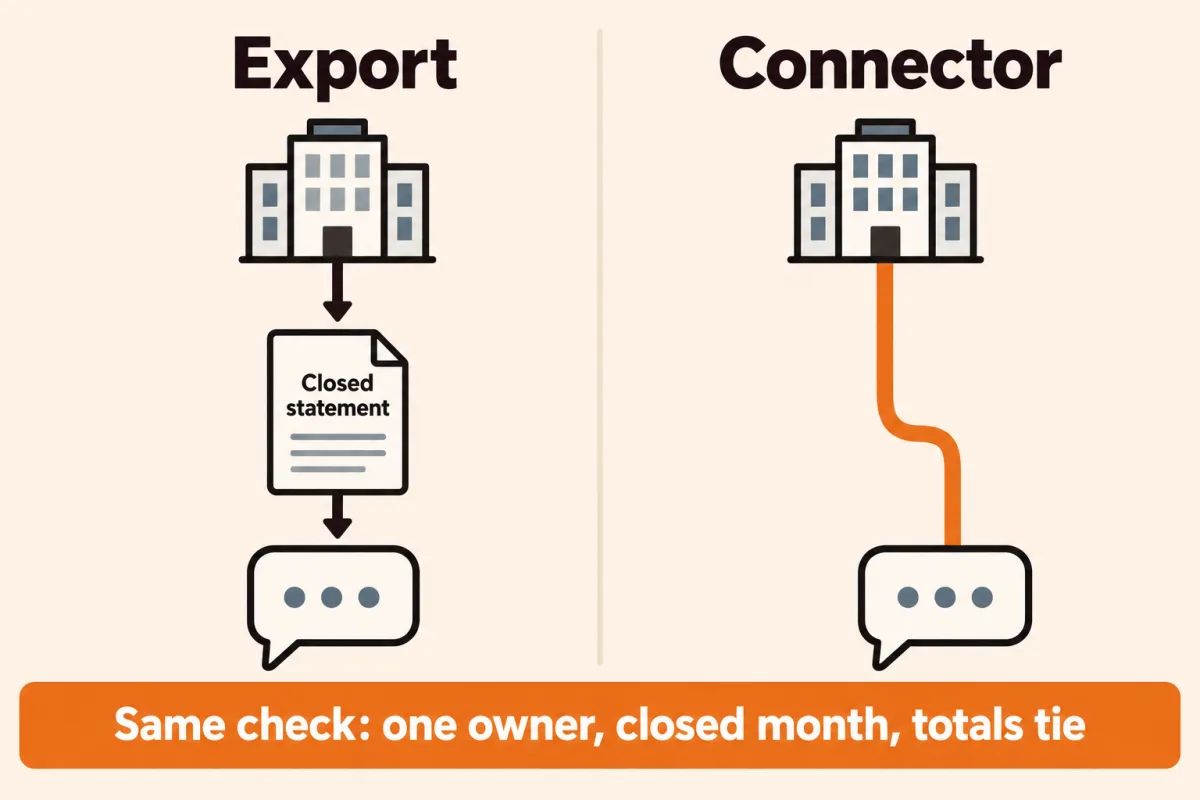
Why start with a downloaded report?
The task is to explain one closed owner statement, with a person checking the result. A downloaded file gives you a specific record to inspect and does not require an API key for this workflow.
The export is a snapshot you chose to hand over. If the draft says something odd, you can open the same file and see where it came from. That makes the check fast, and it keeps the decision about what the AI sees with the person running the job.
Export options are product-specific. AppFolio's owner help describes Excel and CSV report exports. Buildium documents owner access to downloadable reports. DoorLoop's owner statement help lists PDF, CSV, and Excel. That confirms possible file paths, not compatibility with every report layout or account setup.
Vendor references checked 27 September 2026, AppFolio and DoorLoop links rechecked 1 November 2026: AppFolio owner report help, Buildium owner portal documentation, and DoorLoop owner statement help. Available controls can vary by account and change with software updates.
Why AI drafts from exports go wrong
When an owner update built from an export is wrong, the AI is rarely the first thing that failed. The file was. Someone downloaded the report with the wrong filter, so it held three owners instead of one. The month was still open, so a late invoice was missing. A PDF copied its columns out of order, so a repair amount landed next to the wrong unit.
An AI tool reading that file does what it was asked: it explains what it sees. It cannot know the report was filtered wrongly, and if the instructions do not tell it to stop, it will write a confident, readable update from bad data. That is worse than no update, because it reads well enough to send.
So the job splits in two. A person makes sure the file is the right file. The AI explains it and stops when the arithmetic or the scope does not hold up. The checks below are the first half.
Check the file, not the vendor name
Open the exported file yourself. Can you identify the owner, period, beginning balance, every line, stated totals, and ending balance without guessing which column a figure belongs to? If not, fix the export or stop the run.
The format matters less than whether each figure keeps its label. A CSV with clear headers is usually the easiest to check. A spreadsheet can hide things in other tabs. A PDF can look perfect on screen and still copy its numbers out of order. Use the table to decide what to look for.
| File | Useful when | Check before use |
|---|---|---|
| CSV | Each row has clear headers and one meaning per column | Open it and verify owner scope, dates, and totals |
| Spreadsheet | The relevant sheet has readable headings and complete rows | Hidden sheets, merged cells, formulas, and summary tabs |
| Text-based PDF | Numbers and labels remain paired when text is selected or copied | Multi-column text order and missing pages |
| Scanned PDF | Only after reliable text extraction and manual comparison | Recognition errors in names, decimal points, and totals |
A person checks the source and takes the next action.
Readable line versus a line the agent should reject
Examples, not vendor screenshots. The first excerpt keeps a line attached to its owner, period, closed status, unit, and description. The full export must also contain the stated balances and every other line.
Owner: Marcus Webb
Period: July 2026
Status: RECONCILED / CLOSED
Date: 2026-07-18 | Category: Plumbing | Unit: 12A
Memo: Water heater flush | Expense: $180.00
The same charge becomes ambiguous when the copied row looks like this:
7/18 | 12A | MAINT | 180That second row has no owner, year, column names, currency meaning, or closed status. It might be a plumbing expense, but the file does not say so. Get an export with the missing headings and owner filter. Do not ask the agent to reconstruct them.
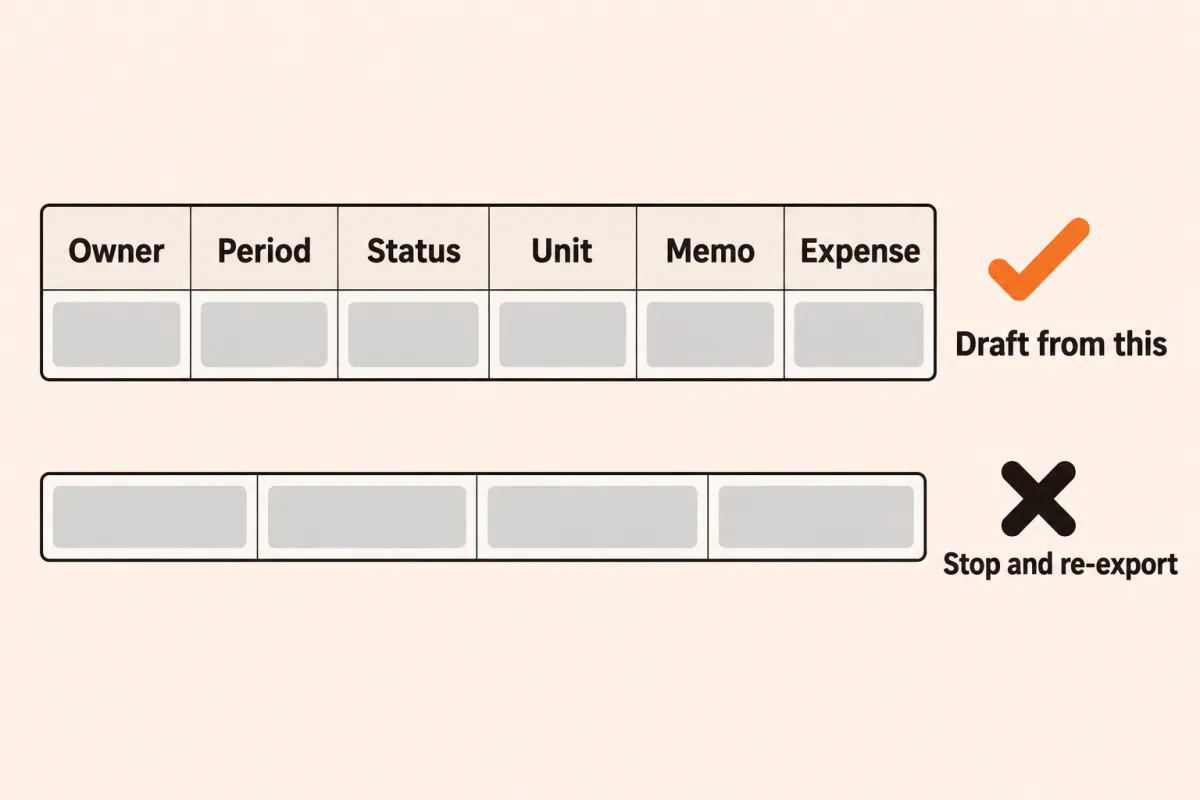
Worked example: an export the agent should stop on
Invented sample, not a live customer result. Beginning balance $1,240. Income $4,450. Expenses $887.40. Distribution $4,500. Those listed figures imply $302.60 remaining: $1,240 + $4,450 - $887.40 - $4,500. If the export states $257.60, the gap is $45.
The correct output is a stop with the difference named. The agent should not change the ending balance, invent a missing transaction, or write an owner update. A person checks the source ledger and exports a corrected, closed month if needed.
A walkthrough: from download to draft
Here is an example. A coordinator closes the month for an owner with two single family homes. They open the owner statement report in their software, filter to that owner and the closed month, and download it as a spreadsheet.
Before attaching it, they open the file. One tab, one owner name at the top, the period stated, a beginning balance, every line with a date, a unit and a description, and an ending balance. They add the lines on a calculator against the stated totals. They tie. Only then does the file go into the chat.
The agent drafts the update. One repair line says only "MAINT" with an amount, so the draft marks it NEEDS A HUMAN rather than inventing a reason. The coordinator pulls the work order, finds it was a garbage disposal replacement, and adds that to the draft. They read every figure in the update against the spreadsheet once more and send it.
The next month the same coordinator downloads the report without changing the filter, and the file holds every owner in the portfolio. The agent, told to check owner scope first, stops and says so. Nothing is drafted from the wrong file. The fix is a quick re-download, not an apology to an owner.
Fix the file that actually failed
When a run stops, fix the thing that stopped it, at the source. Do not edit the export by hand to make the draft work, and do not ask the AI to fill a gap. If the file is wrong, the next file you download from the same report will be wrong too, so the fix belongs in the report settings.
| What you see | What to do next |
|---|---|
| The file includes several owners | Filter or split at the source, then check every row against the chosen owner |
| The month is open or its status is missing | Finish the close or obtain the closed statement; do not turn an in-progress report into a final owner note |
| A PDF copies numbers out of column order | Try a structured export or compare extracted text line by line with the visual report |
| The scanned file misreads a figure | Get a native export if possible; otherwise correct the extraction against the original before any draft |
| The totals do not tie | Check the ledger and report filters with accounting, then export again. Do not make the draft balance by changing a number |
| A fee or repair has no explanation | Use the agreement, invoice, or work order and mark the answer for manager review |
Common mistakes
Attaching an open month. A month that is still being posted will change after the update goes out, and the owner will see a statement that does not match the email. Draft from closed months only.
Trusting the first clean run. One good draft proves that one file worked. It does not prove the next layout will. Check the totals every time, and recheck your process whenever your software changes its reports.
Pasting instead of attaching. Copying a table out of a PDF into the chat is where column order breaks. Attach the file itself, ideally a CSV or spreadsheet, so labels and figures stay together.
Letting the draft fix the numbers. If the totals do not tie, an AI asked to "make it work" may quietly adjust a figure. Tell it to stop and name the gap instead, and fix the ledger with accounting.
How to adapt it
By system. In AppFolio, Buildium, DoorLoop or Rent Manager, find the owner statement report you already send owners and save its filter settings, so the same owner and closed period come out every month. If you use AppFolio and are trialling its Claude connector, still run the same checks on what the draft says: one owner, one closed period, totals that tie.
By portfolio. Single family portfolios with many owners mean many small files, so the saved filter matters most. Multifamily buildings with one owner mean one larger file, so the check on hidden tabs and summary rows matters most.
By owner type. An institutional owner may want the update to follow their own reporting format. Add an example of that format to the instructions so the draft matches it from the first run.
Where AI helps and where a person decides
AI is quick at reading a clean file and turning every line into a plain sentence an owner understands. It is also good at the dull arithmetic check, re-adding the lines against the stated totals and stopping when they disagree, which is the step a tired person skips at month end.
A person decides which file goes in, whether a charge is right, and whether the update is sent. The AI only knows what is in the file. It cannot tell you whether the vendor did the work or whether the fee matches the management agreement.
A quick test with your own export
- Begin with the supplied sample, then a closed month you already know well.
- Confirm one owner, the stated period, and a reconciled, closed status.
- Check that the beginning balance, all line items, stated totals, and ending balance are visible.
- Compare every amount in the draft to the original report. Use invoices and agreements for claims outside it.
- If the report is incomplete or the arithmetic disagrees, stop and fix the source before sending anything.
The Owner Statement Agent publishes 159 independent synthetic Claude prompt runs across three Claude models. Its setup also describes ChatGPT and Codex paths, but that published sweep does not test them. Neither the sweep nor a successful sample proves your vendor export will parse correctly.
What remains a human decision
A file can show a posted repair amount. It may not show why the work happened, whether the vendor did it, or whether a fee matches the agreement. The agent drafts from the records you provide. A manager checks the facts, resolves flags, and chooses whether to send.
What to do next
Download one closed month you already know, run the checks above, and try the free Owner Statement Agent on it. If you have not chosen a tool yet, how to choose between ChatGPT and Claude covers the setup. For what your software already does on its own, see the AI features in AppFolio, Buildium and DoorLoop, and for writing the update itself, the owner statement guide explains every line owners ask about.
Questions
Does this workflow need an API key?
No. The released agent works from a file you attach in your own AI tool. You still need access to that tool and permission to use the report.
Which export format should I try first?
Start with a structured CSV or spreadsheet if your system offers one. A text-based PDF may work after careful checking. A scanned PDF needs reliable text extraction and manual verification before use.
Will a software update affect my export?
It can. Report columns, filters, layouts, and permissions may change. Recheck your sample whenever the vendor changes reporting or your firm changes its report settings.