
What every owner update must contain
The statement your software produces is the record. The update is the explanation that travels with it. Owners read the update first, and they call when it leaves a question open. These six parts close the usual questions before they are asked.
| Part | What it says | Where it comes from |
|---|---|---|
| Subject line | The month and the property, nothing else | The statement period |
| First two lines | What the owner received, or what they owe, and the kind of month it was | The distribution line and the ending balance |
| The five figures | Beginning balance, money in, expenses, paid to the owner, ending balance | The statement totals, exactly as stated |
| Each expense | What it was for, in one plain sentence | The memo, the invoice or the work order |
| What happens next | Anything already decided for next month | The manager, never a guess |
| Sign-off | The firm and a way to reply | Your firm |
Notice what is not on the list: apologies, filler about how hard the team worked, and any figure the statement does not show. An owner who sees a number they cannot find on the statement stops trusting the rest.
From closed statement to sent update
How an owner update gets made
The order matters. Writing the update before checking the totals is how a confident explanation of a wrong number reaches an owner. Checking first takes two minutes and removes the worst outcome entirely.
Template 1: the routine month
Most months are this one. Keep it short, because a long update for a quiet month teaches owners to skim.
Subject: Your [month] statement for [property]
Hi [owner first name],
[Month] was a routine month, and [distribution] went out to you on [date].
Beginning balance [amount]
Money in [amount]
Expenses [amount]
Paid to you [amount]
Ending balance [amount]
Where the expenses went: [expense 1, amount, one-sentence explanation]. [Expense 2, amount, explanation].
Nothing needs your attention before next month. Your full statement is attached.
[Firm name]
Template 2: the month with a repair
Repairs are the commonest reason an owner calls. Say what was done, where, and what the record shows about why. If the record does not say why, say that you are checking.
Subject: Your [month] statement for [property], including a repair at [unit]
Hi [owner first name],
[Distribution] went out to you on [date]. Expenses were higher than usual this month because of one repair at [unit].
[The five figures, as in template 1.]
The repair: [vendor] [work done, from the work order] on [date], [amount]. [What the work order says about the cause, or: "We are confirming the cause with the vendor and will update you."]
[Other expenses, one line each.]
[Firm name]
Do not describe the work from the vendor's name. "Ridgeline Plumbing, 425.00" does not tell you what was done. Get the work order, or say you are getting it.
Template 3: the month that ended negative
The negative balance goes in the first line. An owner who finds it in paragraph three feels handled, not informed, and that feeling outlasts the bad month.
Subject: Your [month] statement for [property]: balance of [negative amount]
Hi [owner first name],
Your account ended [month] at [negative amount], because [the main expense] cost more than the rent collected. No distribution was made this month.
[The five figures.]
[The main expense, what was done and why, from the work order.]
What happens next: [only what your firm has decided, under your management agreement].
[Firm name]
What happens next depends on your management agreement and your firm's decision, so a person writes that sentence. Never let a draft promise a payment plan, a date or a credit nobody has approved.
What the owner sees: the report version
Some owners read an email. Others want something they can file. The same five figures and explanations can go out as a short owner report, saved as a PDF beside the statement your software produces.
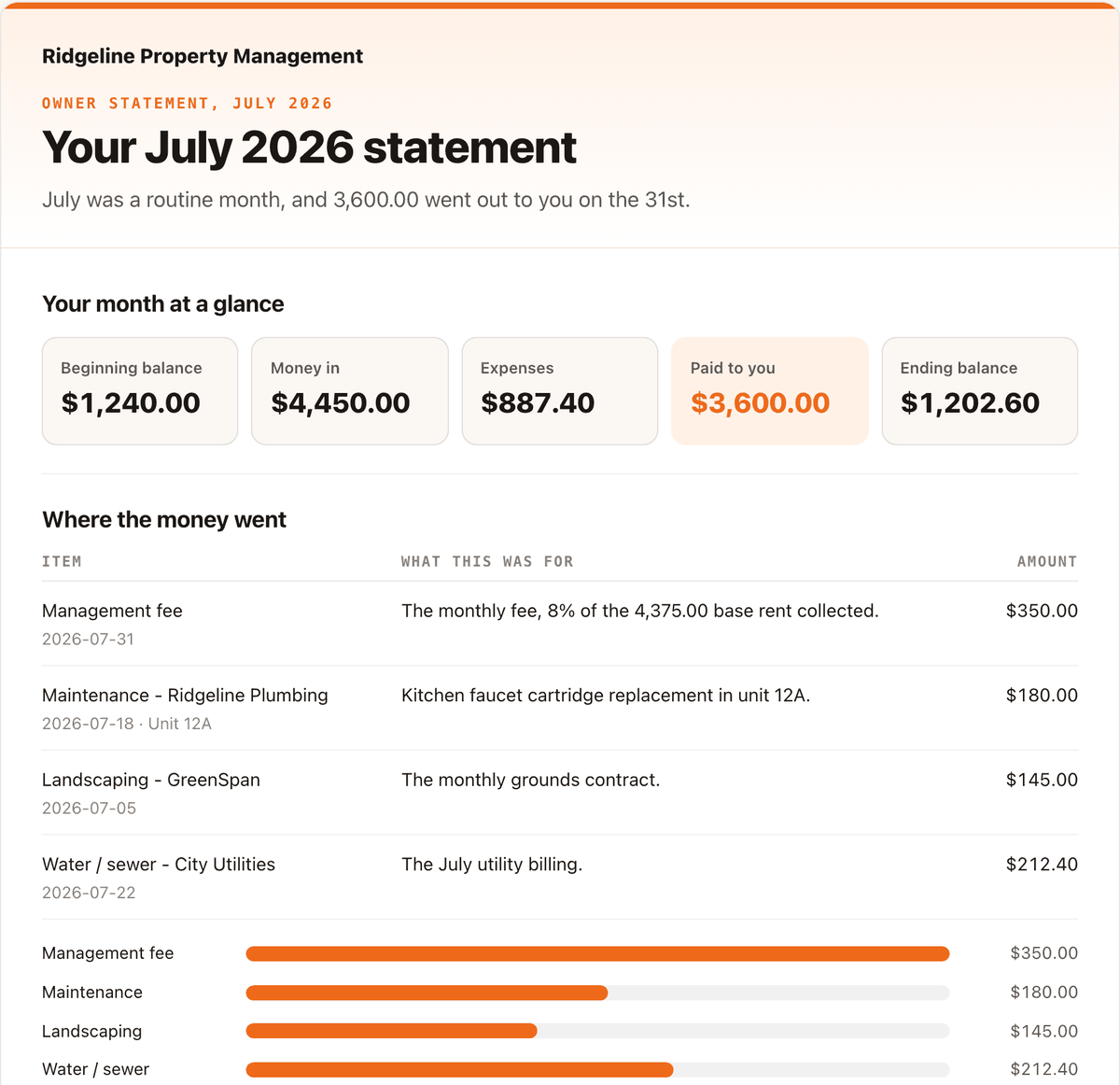
An owner report built by the free Owner Statement Agent from its fictional sample month.
Check it before it goes
- The five figures match the statement exactly, including the cents.
- Every expense has an explanation from a record, or a line saying you are checking.
- Bad news is in the first two lines, stated plainly.
- "What happens next" says only what your firm has decided.
- The update covers one owner, and every property in it belongs to that owner.
- A person read it before it was sent.
Draft it with AI from the closed month
In a ChatGPT or Claude Project that holds your firm's voice, attach one owner's closed statement and send:
Using only the attached closed statement, draft the owner update using template 1, 2 or 3 from this Project, whichever fits the month. Restate the five figures exactly as the statement shows them. Explain each expense only from its memo or description. If a charge has no description, write NEEDS A HUMAN instead of guessing. Put any negative balance in the first line. Do not write what happens next unless it is in the statement.Then check it against the statement line by line. If you would rather not maintain the prompt yourself, the free Owner Statement Agent does this job with the checks built in: it re-adds the totals, stops when they disagree, and flags anything a person has to look at. It is one of the agents in the Sokage library, and members of the Sokage AI community learn to run it on their own months in the 7-Day Agent Challenge.
For the questions owners ask after an update goes out, see why owners call about their statement.
Questions
What should an owner update email include?
The month and property, what the owner received or owes in the first two lines, the five statement figures, an explanation of each expense from a record, anything already decided for next month, and your firm sign-off.
How long should an owner update be?
Short for a routine month. Longer only when a repair or a negative balance needs explaining. A long update every month teaches owners to skim the one that matters.
Should the update explain a lower distribution?
Only from records. State this month figure, and explain a change only when you have the earlier statement or a recorded decision, such as a reserve top-up.
Can AI write owner updates?
It can draft them from a closed statement if it restates figures exactly and refuses to guess. A person still checks every figure and sends it.